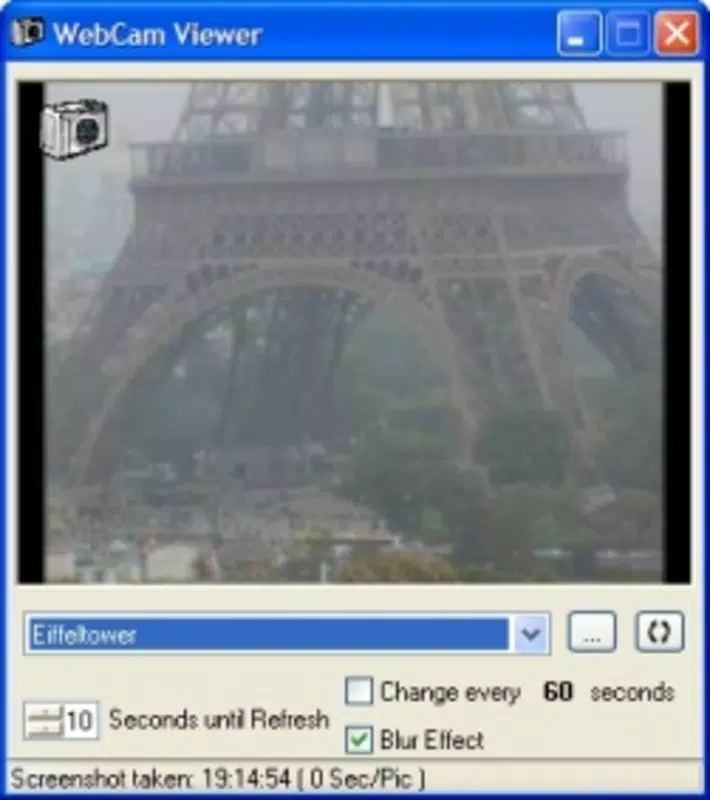

Download WebCam Viewer – webcam, live feed, global exploration, travel, real-time view, explore world
Overview
WebCam Viewer is a lightweight mobile application designed to offer users real-time access to live webcam feeds from diverse global locations. The app enables individuals to virtually explore cities, natural landscapes, monuments, and urban environments without leaving their homes. By providing access to a curated collection of webcams, it serves as a digital window into the world’s most dynamic and scenic spots. The primary purpose of the app is to facilitate global exploration and real-time observation, appealing to travelers, nature enthusiasts, remote workers, and curious users seeking daily visual inspiration.
Target users include anyone interested in monitoring real-world environments, from urban life in major cities to serene mountain vistas or bustling harbor scenes. The app’s utility extends beyond casual viewing—users can observe weather patterns, local events, or cultural rhythms across different time zones. It also supports personalization, allowing users to add custom webcams not included in the default list, enhancing its adaptability for niche interests or specific monitoring needs.
Developed by Joe C. Jones, the app has been available since 2004, indicating a long-standing presence in the mobile utility space. While specific details about the developer’s background are not provided, the app’s longevity suggests consistent maintenance and relevance. WebCam Viewer plays a notable role in the utility ecosystem by offering a simple, focused tool for real-time visual engagement, particularly valuable in a digital age where remote connection and global awareness are increasingly important.
Key Features & Functionality
- Global Webcam Access: Users can browse and view live feeds from webcams located in cities, natural landmarks, and public spaces worldwide. This feature supports spontaneous exploration of remote regions and real-time observation of global environments.
- User-Friendly Interface: The app features a clean, intuitive layout that simplifies navigation. With minimal steps required to access and switch between feeds, even users unfamiliar with technical tools can use the app effectively.
- Custom Webcam Addition: A notable functionality allows users to manually input URLs for webcams not included in the default list. This empowers users to monitor personal or local webcams, such as those at family homes, local parks, or business locations.
- Travel from Home: The app enables immersive virtual travel, letting users experience different cultures and geographies through real-time visual data. This is especially useful for remote workers, travelers planning trips, or those with limited mobility.
- Real-Time Updates: Webcams are streamed live, ensuring users see current conditions. This feature is ideal for observing time-sensitive events, such as weather changes, seasonal shifts, or daily urban rhythms.
For example, a user in Europe could monitor sunrise over the Grand Canyon or check traffic conditions in Tokyo, while a student could observe weather patterns in Antarctica. The ability to add personal webcams also supports practical applications like home security monitoring or remote site oversight.
Interface, UX & Performance
WebCam Viewer presents a minimalist interface focused on functionality and speed. The layout emphasizes direct access to webcam feeds, minimizing clutter and reducing the learning curve. Navigation is straightforward, relying on a grid or list-based display of available webcams, with clear labels and visual indicators for active streams.
Although the developer did not list formal performance metrics, the app’s file size of 2.4 MB suggests a lightweight design optimized for low-resource devices. This implies efficient memory usage and minimal battery drain, which is crucial for an app that runs continuous live streams. The app is designed to load feeds quickly and maintain stable playback, though actual performance may vary based on network conditions and device capabilities.
Responsiveness appears to be a priority, as the interface adjusts smoothly during navigation and feed switching. Stability is likely maintained through consistent updates, given the app’s long availability. However, specific compatibility details were not disclosed, and users should ensure their devices meet general Android requirements for streaming applications.
Platform Compatibility & Technical Requirements
WebCam Viewer is available exclusively on the Android platform. The current version is 1.0.0, with a file size of 2.4 MB. This compact size indicates a minimal footprint, suitable for older or entry-level devices.
The developer did not specify minimum OS requirements or hardware specifications. As such, users should verify compatibility with their device’s Android version and internet connectivity. While the app is free to download and install, it may require an active internet connection to access live feeds, which could impact data usage depending on duration and frequency of use.
Pros and Cons
- Lightweight design with minimal storage footprint
- Free to download and use with no in-app purchases
- Supports custom webcam addition for personalization
- Simple interface suitable for all user levels
- Enables real-time global exploration from any location
- Specific OS and hardware requirements were not disclosed
- No information on update frequency or developer support
- Dependent on external webcams, which may go offline unexpectedly
- Limited to Android platform only
- Relies entirely on third-party webcam sources
FAQ
Is WebCam Viewer safe to download and use?
Yes, the app is free and available through official Android channels. As it does not request sensitive permissions and relies on external webcams, it poses minimal security risk. However, users should only add trusted webcam URLs to avoid potential exposure to unintended content.
Can I use WebCam Viewer on iOS devices?
Currently, the app is only available on Android. There is no official iOS version listed, and the developer has not announced plans for cross-platform release.
How do I add a custom webcam to the app?
Users can manually input the URL of a webcam feed through the app’s settings or add function. This feature allows access to webcams not included in the default list, offering a high degree of personalization.
Does WebCam Viewer require an internet connection?
Yes, an active internet connection is required to access live webcam feeds. The app streams content in real time, so connectivity is essential for uninterrupted viewing.
How often is the app updated?
The developer did not provide information on update frequency. However, the app has been available since 2004, suggesting ongoing maintenance. Users are encouraged to check for updates in the Google Play Store.
Final Thoughts
WebCam Viewer stands out as a dedicated, no-frills tool for real-time global exploration. Its lightweight design, free access, and ability to integrate custom webcams make it a valuable utility for users seeking visual engagement with the world beyond their screens. While it lacks detailed technical specifications and platform expansion, its core functionality remains robust and purposeful.
It is especially beneficial for travelers, remote workers, educators, and hobbyists interested in observing real-world environments. The app’s long-standing presence speaks to its reliability and enduring appeal in a niche but meaningful category.
For anyone looking to explore the planet from their smartphone, WebCam Viewer delivers a simple, effective experience. Download WebCam Viewer now.


